Tencent · Hunyuan 3DLive

Hunyuan 3D 3.6: High-poly 3D models ready for production

Tencent's Nov 27, 2026 flagship, live in Hello 3D Studio from 40 credits: up to 2M-face geometry, richer PBR materials, and cleaner character faces and hands.

Showcase: Tencent Hunyuan 3D
Maker
Tencent
Released
Nov 27, 2026
Built for
High-poly game, film & 3D prints
On Hello 3D
Live · from 40 credits

Hunyuan 3D 3.6 in short

Hunyuan 3D 3.6 (also called Hy3D 3.6) is Tencent's professional 3D asset generation model released on Nov 27, 2026 as the successor to Hunyuan 3D 3.1 Pro. It upgrades both high-poly geometry and PBR texture fidelity: default mesh detail scales to roughly 2,000,000 faces with multi-tier face control, surfaces and part boundaries stay clean, and character hands and faces generate more reliably. Unlike earlier open-weight Hunyuan releases, 3.6 is a commercial model available via Tencent Cloud and directly inside Hello 3D Studio. On Hello 3D, members can run Hunyuan 3D 3.6 from one to four views starting at 40 credits (or 55 credits with full PBR metallic, roughness and normal maps enabled), choose Auto (~2M faces) or lower caps (150K, 500K, 1M), and export GLB, FBX, OBJ, USDZ, STL or 3MF.

What's new

Three upgrades that separate Hunyuan 3D 3.6 from 3.1

Tencent's v3.6 release targets artist-grade modeling requirements across geometry, PBR materials and character anatomy. Below are Tencent Hunyuan 3D v3.6 official showcase examples.

Textured PBR render of the silver-white winged dragon generated with Tencent Hunyuan 3D 3.6PBR output
Untextured grey clay sculpt of a silver-white winged dragon from Tencent Hunyuan 3D 3.6 showing individual scales and sharp clawsClay mesh
01High-poly precision

Up to 2M-face detail with multi-tier control

Hunyuan 3D 3.6 raises the default mesh target toward 2,000,000 faces—up from the 1.5M limit on 3.1 Pro—so layered dragon scales, sharp horns, thin wing membranes and intricate carvings hold crisp relief even in untextured clay. In our own Hello 3D Studio test, a default run measured 1,994,818 triangles. When you need lighter assets for web previews or faster slicing, Hello 3D lets you cap face count at 150K, 500K or 1M.

Tencent Hunyuan 3D v3.6 showcase · up to 2M faces

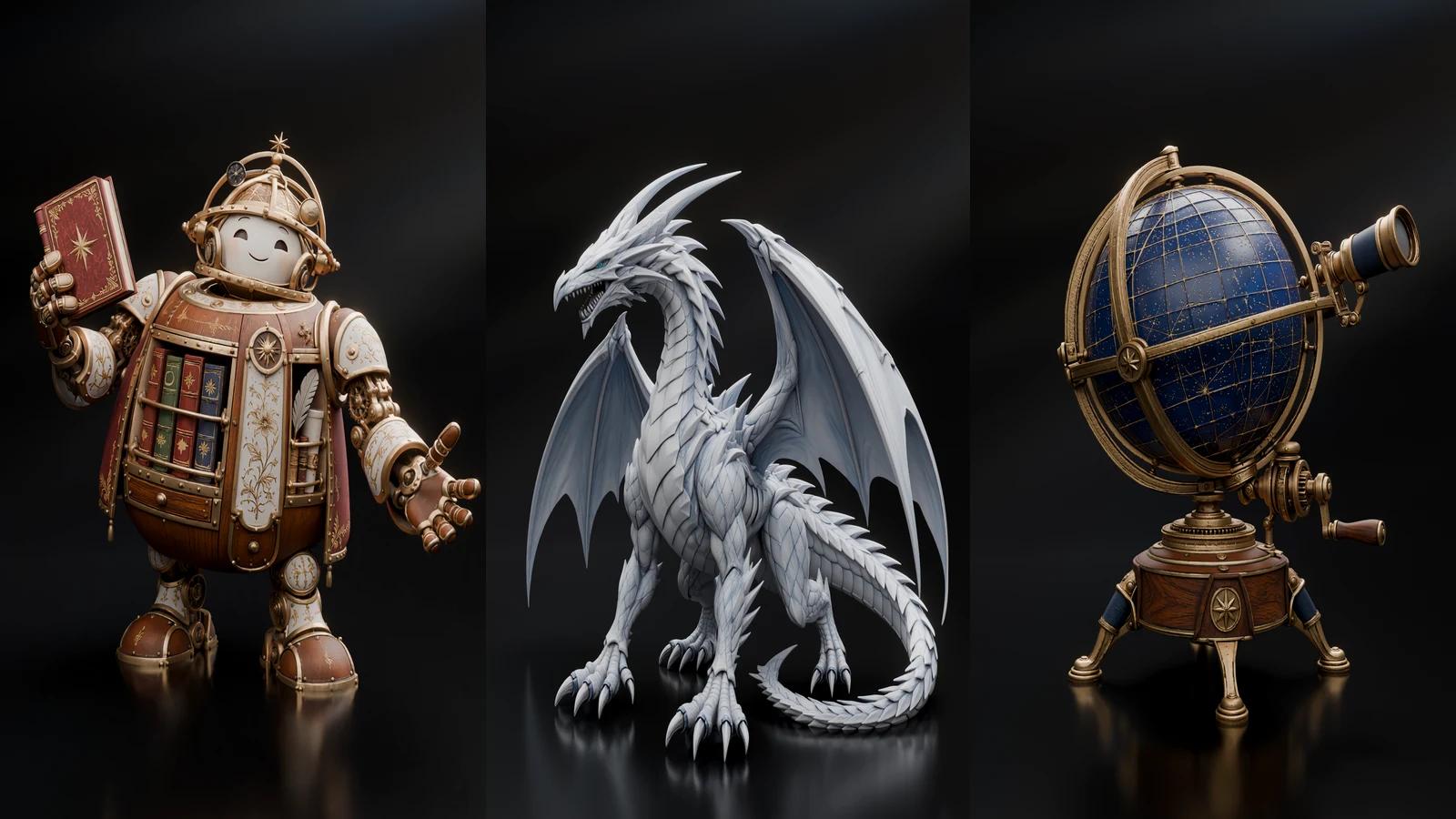
Official Tencent Hunyuan 3D 3.6 PBR render of a steampunk mechanical book-keeper robot with brushed brass gears, varnished wood chest, tiny leather books and porcelain gold filigree
02Native PBR materials

Richer metallic, wood, porcelain and leather response

Hy3D 3.6 compresses geometry and material properties into a shared sparse representation and refines outputs with supervised fine-tuning and preference optimization. Brushed brass gears, gilded porcelain inlays, varnished oak grain and stitched leather bindings reflect light cleanly across distinct parts instead of baking flat color onto messy surfaces. Turn on the PBR switch in Hello 3D Studio (55 credits) whenever you want metallic, roughness and normal maps for Unreal, Unity or Blender.

Tencent Hunyuan 3D v3.6 showcase · PBR materials
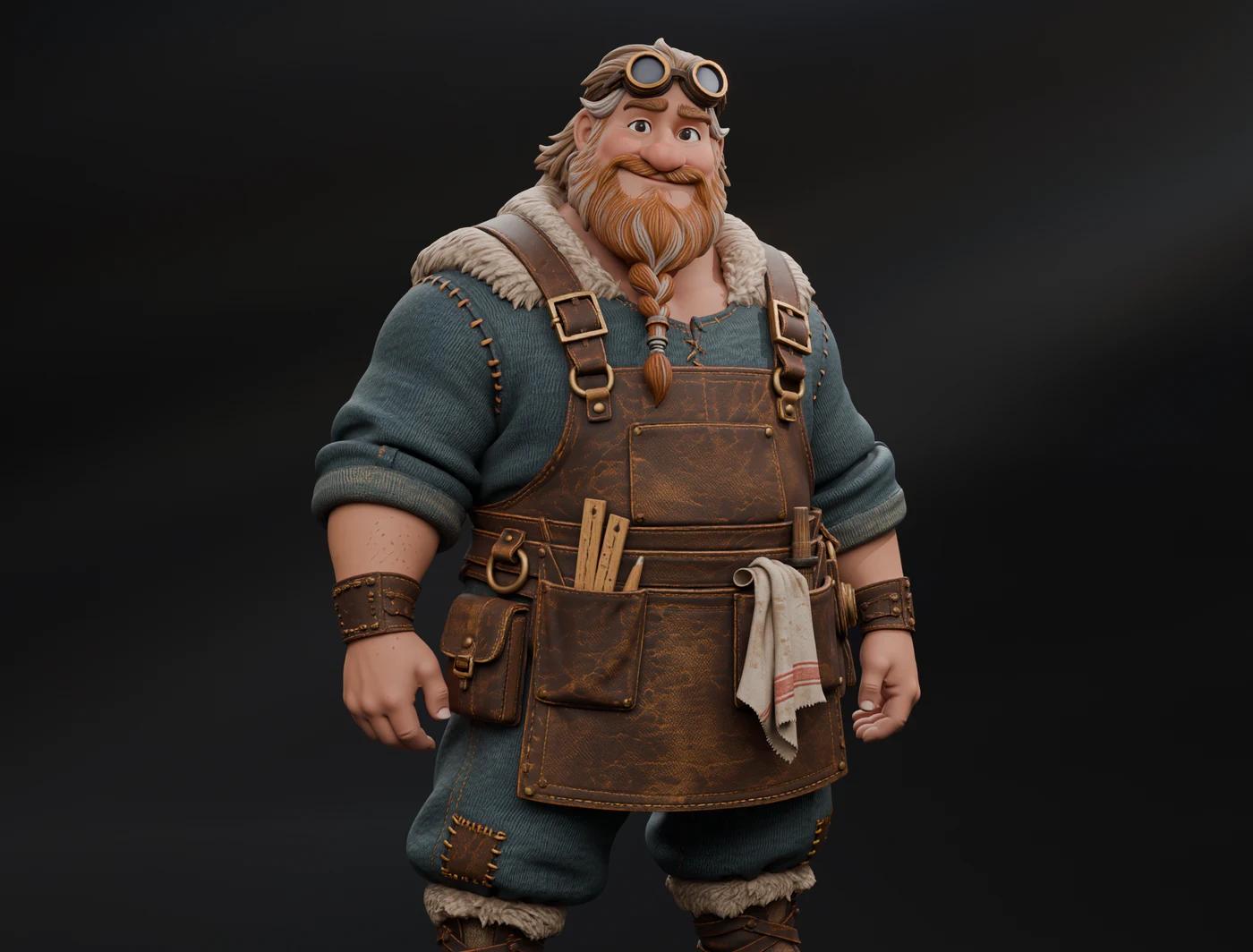
Official Tencent Hunyuan 3D 3.6 PBR render of a bearded craftsman wearing brass goggles, a stitched brown leather apron, fur collar and knitted sleeves with cleanly sculpted hands
03Characters & anatomy

More stable faces, hands and layered garments

Tencent's v3.6 release highlights a clear jump on character models: facial proportions, expressions and five-fingered hands come out more reliably, while layered clothing—weathered leather aprons, brass buckles, knitted wool sleeves, fur trim and belt pouches—keeps crisp boundaries between soft cloth and hard hardware.

Tencent Hunyuan 3D v3.6 showcase · character detail
Nov 27, 2026
Released by Tencent Hunyuan
Up to 2M
High-poly target with multi-tier caps
1 to 4 views
Front plus left, back and right in Studio
40 / 55 cr
Default diffuse / full PBR on Hello 3D

Clay to PBR reveal

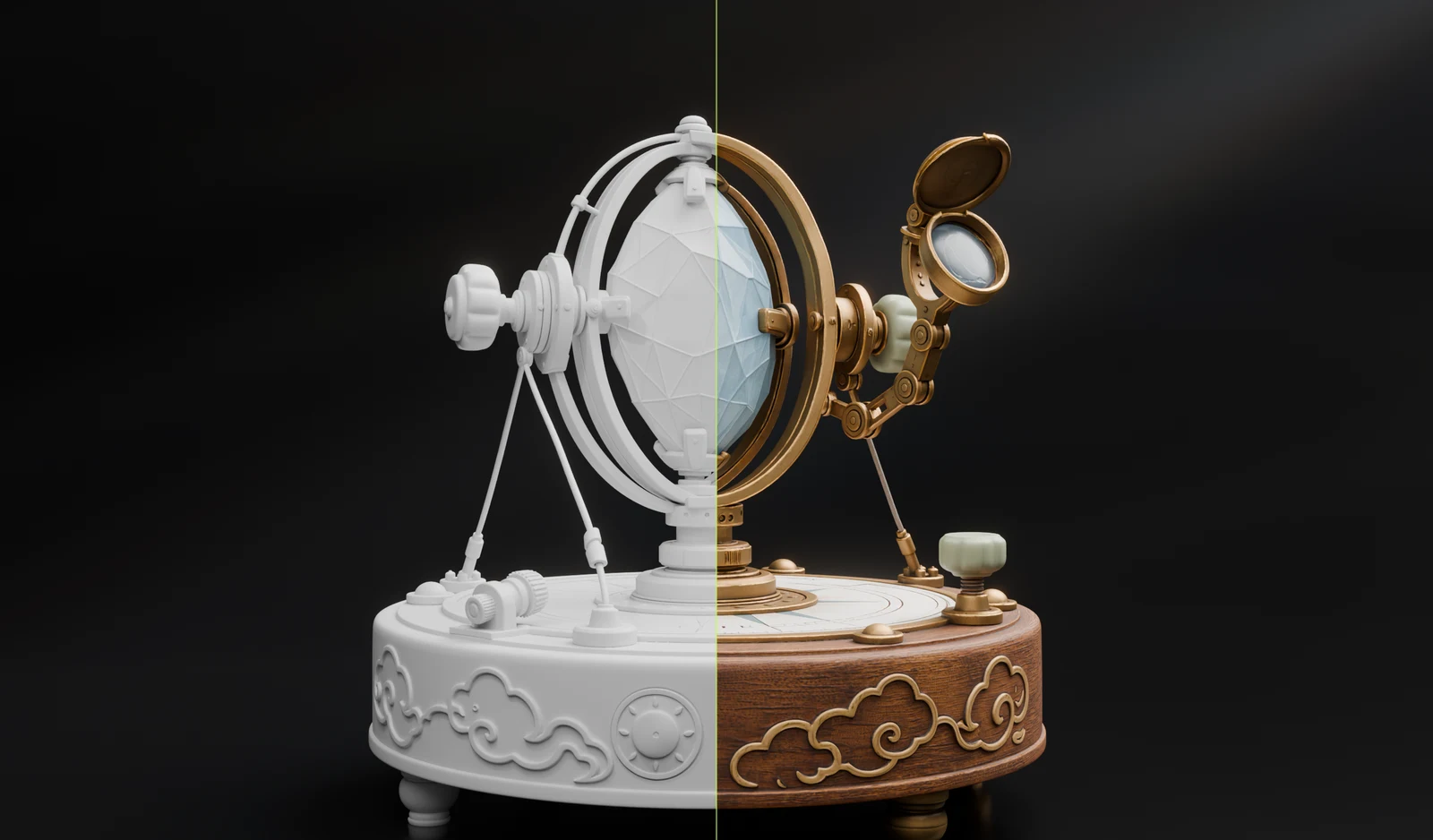
Compare raw 3.6 geometry against finished PBR materials

Jump between five official Tencent Hunyuan 3D v3.6 showcase models—each wiping from untextured high-poly clay into finished PBR materials.

Chapters

Visuals assembled from official Tencent Hunyuan 3D v3.6 paired clay and PBR showcase renders (3d.hunyuan.tencent.com).

Official v3.6 showcase

Characters, creatures, brass props and precision artifacts

Official Tencent Hunyuan 3D v3.6 showcase models spanning hard-surface brasswork, organic creatures and clay-to-PBR detail.

Steampunk mechanical book-keeper: brushed brass, wood grain and gilded porcelain
Antique brass celestial globe with engraved starry enamel and gears
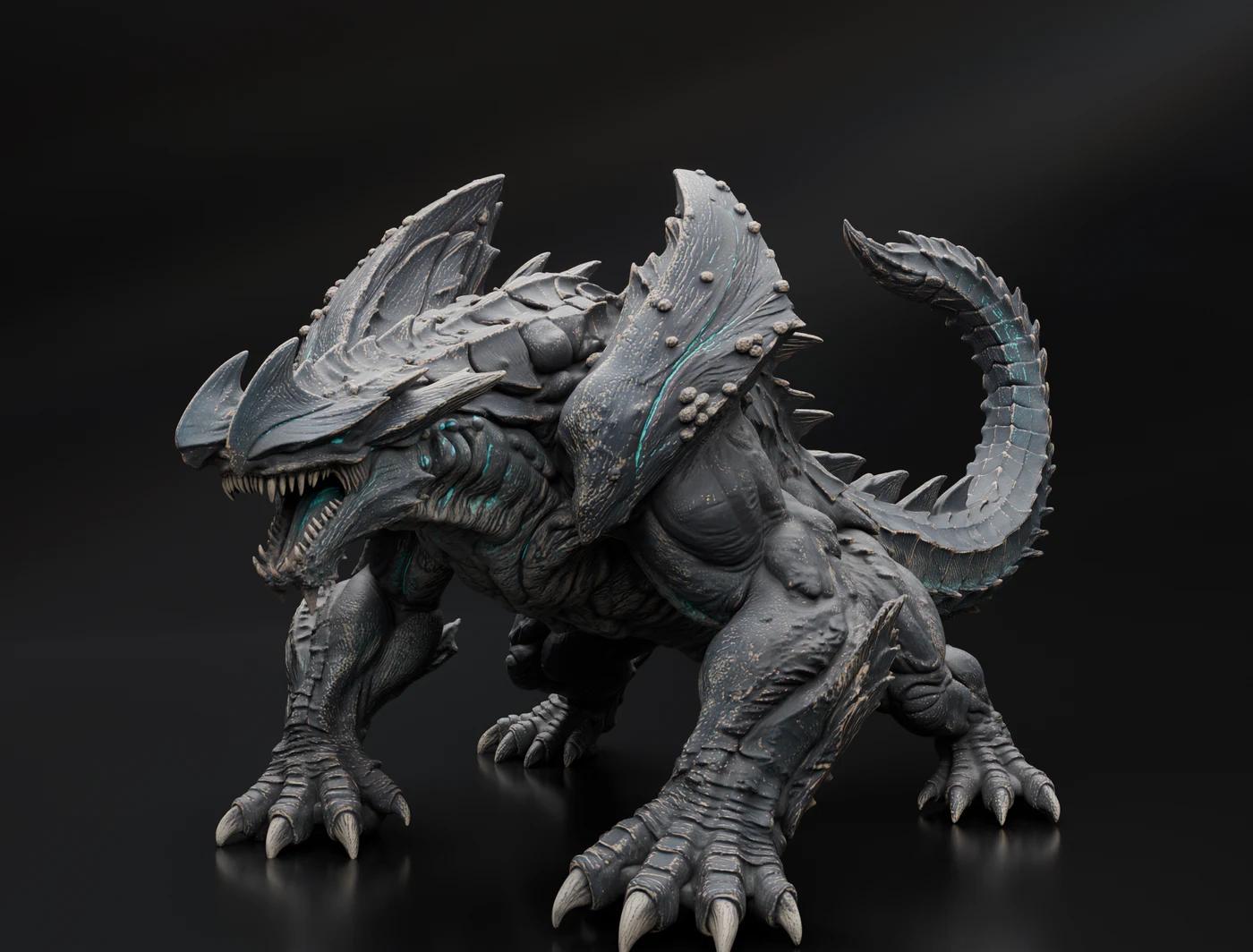
Armored kaiju creature with chitinous plates and organic skin
Faceted crystal and brass gimbal lens: raw clay vs PBR split

Examples: Tencent Hunyuan 3D v3.6 showcase (3d.hunyuan.tencent.com). Enable PBR in Hello 3D Studio (55 credits) for full metallic, roughness and normal maps.

Compare

Hunyuan 3D 3.6 vs 3.1 Pro vs 3.1 Rapid

All three Hunyuan 3D models run live inside Hello 3D Studio. Compare mesh budgets, inputs, speed and credit pricing side by side.

FeatureHunyuan 3D 3.6LiveHunyuan 3D 3.1 ProHunyuan 3D 3.1 Rapid
ReleaseNewest flagship (Nov 27, 2026)Previous Pro generationLightweight fast tier
Built forHigh-poly characters, creatures, props, figurines & 3D printingHigh-detail assets up to 1.5M facesQuick look-dev and rapid iterations
Inputs on Hello 3DSingle image or multi-view (up to 4 views)Single image or multi-view (up to 4 views)Single image
Face budget in StudioAuto (~2M faces), 150K, 500K or 1MAuto, 150K, 1M or 1.5MAutomatic
Textures & PBR4K default (up to 8K upstream); optional PBR & geometry-only4K textures; optional PBR & geometry-onlyTextured or geometry-only; optional PBR
Typical wait3–6 minutes2–5 minutes40 s – 2 minutes
On Hello 3DLive · 40 credits (+15 each for PBR, multi-view or face cap)Live · 40 credits (+15 each for PBR, multi-view or face cap)Live · 25 credits (+15 for PBR)

Studio controls, typical wait times and credit prices come directly from Hello 3D's live catalog. Upstream Hunyuan 3D 3.6 also supports text prompts and higher view counts on Tencent's own tools.

Use it now

Run Hunyuan 3D 3.6 in Hello 3D Studio

Hunyuan 3D 3.6 is already the default version in the Hunyuan 3D family—starting at 40 credits (55 credits with full PBR maps) with export to seven 3D formats and built-in retopology.

  1. 01

    Open the 3D generator

    Sign in and open the model studio. Become a member to unlock more models with any credit pack or plan.

  2. 02

    Choose Hunyuan 3D 3.6

    Pick Hunyuan 3D from the model selector (3.6 is selected first). Toggle PBR on for metallic/roughness realism, and keep Auto (~2M faces) or pick 150K, 500K or 1M.

  3. 03

    Upload 1 to 4 views

    Drop a clean front image with the whole silhouette in frame, or switch to Multi-view to add left, back and right views for tighter rear accuracy.

  4. 04

    Inspect, retopo or export

    Check the mesh in solid, textured or wireframe mode, run studio retopology if you need game-ready poly counts, then export GLB, FBX, OBJ, USDZ, STL or 3MF.

Open Hunyuan 3D 3.6 in Studio

Default single-image textured generation costs 40 credits; enable PBR (+15) for metallic, roughness and normal maps. Multi-view and custom face caps add 15 credits each.

Is this model right for your job

Where Hunyuan 3D 3.6 shines, and when to pick another model

Good fit if you

  • Need dense high-poly detail (up to ~2M faces) for characters, creatures, brass props, figurines or resin 3D printing
  • Want physically based metallic, leather, cloth and wood material response—just toggle PBR on in Hello 3D Studio
  • Plan to retopologize and bake high-poly sculpt detail onto a lighter game mesh

Pick another studio model if you

  • Need native low-poly quads straight out of generation: try Tripo P2 or Meshy Game Ready instead
  • Want text-to-3D generation without a reference image: Hello 3D Studio runs Hunyuan 3.6 on image and multi-view inputs—use Hello 3D v3.1 or Tripo for text prompts
  • Need results in under a minute for fast thumbnails: Hunyuan 3D 3.1 Rapid or Rodin 2.5 Fast is quicker and costs fewer credits

FAQ

Hunyuan 3D 3.6 questions

Direct answers covering capabilities, PBR settings, differences from 3.1 Pro and credit pricing.

Sources and how this page is verified

Model capabilities and release highlights come from Tencent Hunyuan 3D's official portal (3d.hunyuan.tencent.com), Nov 27, 2026 launch coverage and Tencent Cloud documentation. Showcase visuals use official Tencent Hunyuan 3D v3.6 paired clay and PBR examples hosted locally and credited on screen. Studio controls and credit prices read directly from Hello 3D's live catalog.

Page updates

  1. First published with live Hello 3D Studio integration, official Tencent Hunyuan 3D v3.6 clay-to-PBR showcase visuals and live credit pricing.

Generate now

Try Hunyuan 3D 3.6 in Hello 3D Studio

Upload one image or up to four views, generate high-poly meshes from 40 credits (55 credits with PBR), and export GLB, FBX, OBJ, USDZ, STL or 3MF.

Open the 3D generator